Building a Polymarket Telegram Alerts Bot with Struct Webhooks
A technical walkthrough of how we built a real-time Telegram bot that delivers Polymarket alerts using Struct webhooks, Cloudflare Workers, and D1. Full architecture, code, and lessons learned.

What we built
We built @StructAlertsBot — a Telegram bot that sends you real-time Polymarket alerts. Whale trades, probability spikes, market metrics, wallet tracking. You paste a Polymarket link or a wallet address, pick what you care about, and the bot handles the rest.
The entire thing runs on Cloudflare Workers with D1 (SQLite at the edge). Three dependencies. Zero servers. Under 2,000 lines of TypeScript. And the only reason it works in real time is Struct webhooks — Polymarket doesn't offer any.
This article walks through the full architecture, key implementation details, and the decisions we made along the way. If you want to build something similar (a Discord bot, a trading dashboard, an alerting pipeline), the same patterns apply.
Architecture overview
The bot has three HTTP endpoints, all handled by a single Cloudflare Worker:
export default {
	async fetch(request: Request, env: Env, ctx: ExecutionContext): Promise<Response> {
		const url = new URL(request.url);

		if (request.method === "POST" && url.pathname === "/telegram")
			return webhookCallback(bot, "cloudflare-mod")(request);

		if (request.method === "POST" && url.pathname.startsWith("/struct/webhook/"))
			return handleStructWebhook(request, env, ctx, webhookId);

		if (request.method === "GET" && url.pathname === "/health") return new Response("OK", { status: 200 });

		return new Response("Not Found", { status: 404 });
	},
};
POST /telegram — Telegram sends bot updates here. We use grammY in webhook mode (not long-polling), which is ideal for serverless since each update is a stateless HTTP request.
POST /struct/webhook/{webhookId} — Struct delivers events here. Each webhook gets a unique URL path containing its ID, so we can route events to the right monitors without parsing the payload first.
GET /health — Standard uptime check.
The data flow looks like this:
User sends Polymarket URL to bot
  → Bot looks up market via Struct SDK
  → User picks alert type + filters via inline keyboards
  → Bot creates a webhook on Struct API
  → Struct fires events to /struct/webhook/{id}
  → Worker verifies signature, matches monitors, sends Telegram messages
The data layer: Cloudflare D1
We chose D1 because it's SQLite at the edge — zero latency from the Worker, no connection pooling to manage, and the schema is simple enough that SQLite is perfect. Five tables:
CREATE TABLE users (
    telegram_id INTEGER PRIMARY KEY,
    username TEXT,
    first_name TEXT,
    is_active INTEGER DEFAULT 1,
    created_at TEXT DEFAULT (datetime('now'))
);

CREATE TABLE market_monitors (
    id INTEGER PRIMARY KEY AUTOINCREMENT,
    telegram_id INTEGER NOT NULL,
    condition_id TEXT NOT NULL,
    event_type TEXT NOT NULL,
    struct_webhook_id TEXT,
    filters TEXT DEFAULT '{}',
    is_active INTEGER DEFAULT 1,
    UNIQUE(telegram_id, condition_id, event_type)
);

CREATE TABLE trader_monitors (
    id INTEGER PRIMARY KEY AUTOINCREMENT,
    telegram_id INTEGER NOT NULL,
    wallet_address TEXT NOT NULL,
    event_type TEXT NOT NULL,
    struct_webhook_id TEXT,
    filters TEXT DEFAULT '{}',
    is_active INTEGER DEFAULT 1,
    UNIQUE(telegram_id, wallet_address, event_type)
);
Two types of monitors, two tables. market_monitors track events on specific Polymarket markets (identified by condition_id). trader_monitors track events on specific wallets. Both store a struct_webhook_id that links back to the Struct webhook that feeds them, and filters as a JSON string for client-side matching.
Two additional tables (monitor_drafts and monitor_removal_sessions) handle transient UI state during the monitor creation and deletion flows. They're keyed by telegram_id so each user has at most one active draft at a time.
Indexes on (condition_id, is_active) and (wallet_address, is_active) keep subscriber lookups fast during webhook delivery.
Consuming Struct webhooks
This is where the interesting engineering lives. When a Struct webhook fires, the Worker needs to:
- Verify the HMAC signature
- Detect the event type
- Find all monitors subscribed to this webhook + event
- Apply per-monitor filters
- Format and send Telegram messages
Signature verification
Every Struct webhook payload is signed with HMAC-SHA256. The signature arrives in the x-struct-signature header as sha256=<hex>. Since Cloudflare Workers don't have Node's crypto module, we use the Web Crypto API:
async function importKey(secret: string): Promise<CryptoKey> {
	return crypto.subtle.importKey("raw", new TextEncoder().encode(secret), { name: "HMAC", hash: "SHA-256" }, false, [
		"sign",
	]);
}

export async function verifyWebhookSignature(body: string, signature: string, secret: string): Promise<boolean> {
	const key = await importKey(secret);
	const signed = await crypto.subtle.sign("HMAC", key, new TextEncoder().encode(body));
	const computed = bufferToHex(signed);
	const rawSignature = signature.startsWith("sha256=") ? signature.slice(7) : signature;
	return timingSafeEqual(computed, rawSignature);
}
The timingSafeEqual function does a constant-time comparison to prevent timing attacks — a detail that's easy to overlook but matters in production.
Event detection and routing
Struct webhooks can deliver multiple event types. We detect the type from the payload or headers:
const SUPPORTED_EVENTS = new Set([
	"condition_metrics",
	"probability_spike",
	"price_spike",
	"close_to_bond",
	"trader_first_trade",
	"trader_new_market",
	"trader_whale_trade",
]);
Once we know the event type and webhook ID, we query D1 for all active monitors on that webhook:
const monitors = await getMarketMonitorsByWebhookAndEvent(db, webhookId, eventType);Because each Struct webhook has a unique URL path (/struct/webhook/{id}), we already know which webhook fired. The database query is a simple indexed lookup — no need to scan all monitors.
Client-side filter matching
Struct webhooks support server-side filtering (you configure filters when creating the webhook), but multiple users can share a single webhook with different personal filter preferences. So we apply a second round of filtering on our end.
Each monitor stores its filters as JSON. When an event arrives, we check every filter field against the payload:
function matchesMonitorFilters(eventType, payload, filters): boolean {
	if (!matchesStringList(filters.condition_ids, payload.condition_id)) return false;
	if (!matchesExcludeShortTerm(filters, payload.event_slug)) return false;

	switch (eventType) {
		case "probability_spike":
			return (
				matchesMin(filters.min_probability_change_pct, Math.abs(payload.spike_pct)) &&
				matchesDirection(filters.spike_direction, payload.spike_direction)
			);
		case "trader_whale_trade":
			return (
				matchesMin(filters.min_usd_value, payload.amount_usd) && matchesMin(filters.min_probability, payload.price)
			);
		// ... other event types
	}
}
This approach means we can let multiple users share a webhook (important for staying within API limits) while still giving each user personalised filtering.
Sending notifications
After filtering, we fan out notifications to all matched Telegram users in parallel:
export async function notifySubscribers(
	bot: Bot,
	telegramIds: number[],
	message: string,
	imageUrl?: string | null,
): Promise<void> {
	await Promise.allSettled(telegramIds.map((id) => sendToUser(bot, id, message, imageUrl)));
}
Promise.allSettled is important here — if one user has blocked the bot, it shouldn't prevent other users from getting their alerts. We also try to send the market image as a photo with the alert text as a caption, falling back to a plain text message if the image fetch fails.
The entire webhook handler returns 200 OK immediately and processes notifications in the background using ctx.waitUntil(), so Struct never sees a timeout.
Creating webhooks: the reuse problem
Here's a problem that's easy to miss: if every monitor creates its own Struct webhook, you'll hit the API limit quickly. Struct allows up to 100,000 webhooks per account, which sounds like a lot until you consider that users might monitor hundreds of markets each.
Our solution: webhook reuse with a scoring system.
When a user creates a new monitor, we check if any existing webhook can serve it. The algorithm compares filters between the new monitor and existing webhooks, calculating a "reuse score":
export async function findReusableMonitorWebhook(
	deps: WebhookDeps,
	eventType: PolymarketWebhookEvent,
	requestedFilters: MonitorFilters,
	candidateWebhookIds: string[],
): Promise<string | null> {
	let bestMatch = null;

	for (const webhookId of candidateWebhookIds) {
		const webhook = await getWebhook(deps, webhookId);
		if (!webhook || webhook.event !== eventType) continue;

		const existingFilters = normalizeStructWebhookFilters(eventType, webhook.filters ?? {});
		const score = getStructWebhookReuseScore(eventType, existingFilters, requestedFilters);
		if (score === null) continue;

		const exact = areStructWebhookFiltersEqual(eventType, existingFilters, requestedFilters);
		if (!bestMatch || score < bestMatch.score || (score === bestMatch.score && exact)) {
			bestMatch = { webhookId, score, exact, url: webhook.url };
		}
	}

	if (!bestMatch) return null;
	await ensureWebhookRoute(deps, bestMatch.webhookId, bestMatch.url);
	return bestMatch.webhookId;
}
If filters are identical, the webhook is reused directly. If the new monitor's filters are a subset of an existing webhook's, we can still reuse it (the webhook will send more events, and client-side filtering handles the rest). If no match is found, we create a new webhook.
We also have a findAndExpandWebhook function that can merge condition_ids into an existing webhook — so if a webhook already tracks markets A and B, and a new monitor wants the same filters for market C, we update the webhook's condition_ids to include C rather than creating a new one.
Webhook lifecycle
Creating a webhook has a quirk: we need the webhook ID to construct the callback URL, but we need the URL to create the webhook. We solve this with a two-step process:
export async function createMonitorWebhook(deps, eventType, filters, description) {
	const response = await deps.client.webhooks.create({
		url: `${deps.webhookBaseUrl}/struct/webhook/pending`,
		event: eventType,
		secret: deps.webhookSecret,
		filters,
		description,
	});

	const webhookId = response.data.id;
	await deps.client.webhooks.update({
		webhookId,
		url: `${deps.webhookBaseUrl}/struct/webhook/${webhookId}`,
	});

	return webhookId;
}
Create with a placeholder URL, get the ID back, then immediately update the URL to include the ID. If the update fails, we clean up by deleting the webhook.
When a monitor is deleted, we remove its condition_id from the shared webhook. If no monitors reference the webhook anymore, we delete it from Struct entirely — no orphaned webhooks consuming quota.
The Telegram bot UX
grammY handles the Telegram side cleanly. We register commands, inline keyboards, and callback handlers:
export function createBot(env: Env): Bot {
	const bot = new Bot(env.BOT_TOKEN, { botInfo: JSON.parse(env.BOT_INFO) });

	bot.api.config.use((prev, method, payload, signal) =>
		prev(method, { ...payload, link_preview_options: { is_disabled: true } }, signal),
	);

	const mainMenu = createMainMenu(env);
	bot.use(mainMenu);

	registerStart(bot, env, mainMenu);
	registerHelp(bot, env, mainMenu);
	registerTrader(bot, env);
	registerUnsubscribe(bot, env);
	registerList(bot, env);
	registerExample(bot);
	registerCallbackHandler(bot, env);
	registerTextHandler(bot, env);

	return bot;
}
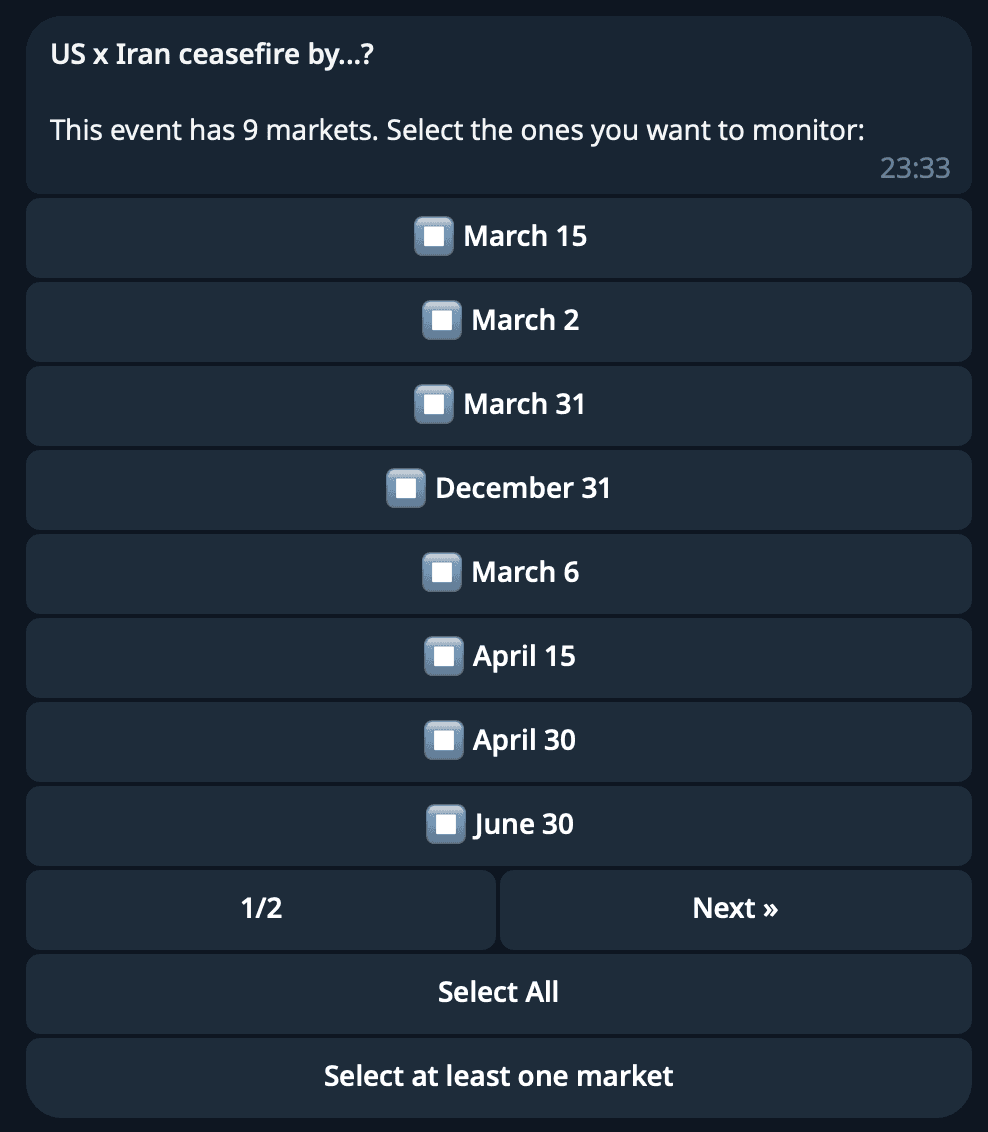
The text handler is the primary entry point for most users. When someone sends a Polymarket URL, we parse the event slug from it, look up the market via the Struct SDK, and start the monitor creation flow:
1. User pastes polymarket.com/event/fed-rate-cut
2. Bot calls Struct API → gets event with all markets
3. If multiple markets → multi-select keyboard
4. User picks alert type (Probability Spike, Whale Trade, etc.)
5. User configures filters via inline buttons
6. Bot creates Struct webhook, stores monitor in D1
For wallet tracking, the user sends /trader 0x... or just pastes an Ethereum address directly. The bot validates the format, offers event type selection, and creates a trader monitor with the same flow.
Example message to create a market monitor:
Handling state in serverless
Cloudflare Workers are stateless. Every request creates a fresh bot instance. The monitor_drafts table acts as our state store — when a user is mid-flow configuring a monitor, their progress is saved to D1.
Each draft also stores a message_id — the Telegram message containing the inline keyboard. This prevents a subtle bug: if a user starts a flow, then starts another one, clicking buttons on the old message shouldn't affect the new flow. We check message_id on every callback and ignore stale interactions.
Message formatting
Alerts need to be scannable at a glance. We format them as HTML (Telegram supports a subset of HTML in messages) with emoji prefixes, bold labels, and inline code for values. See the screenshot below for an example.
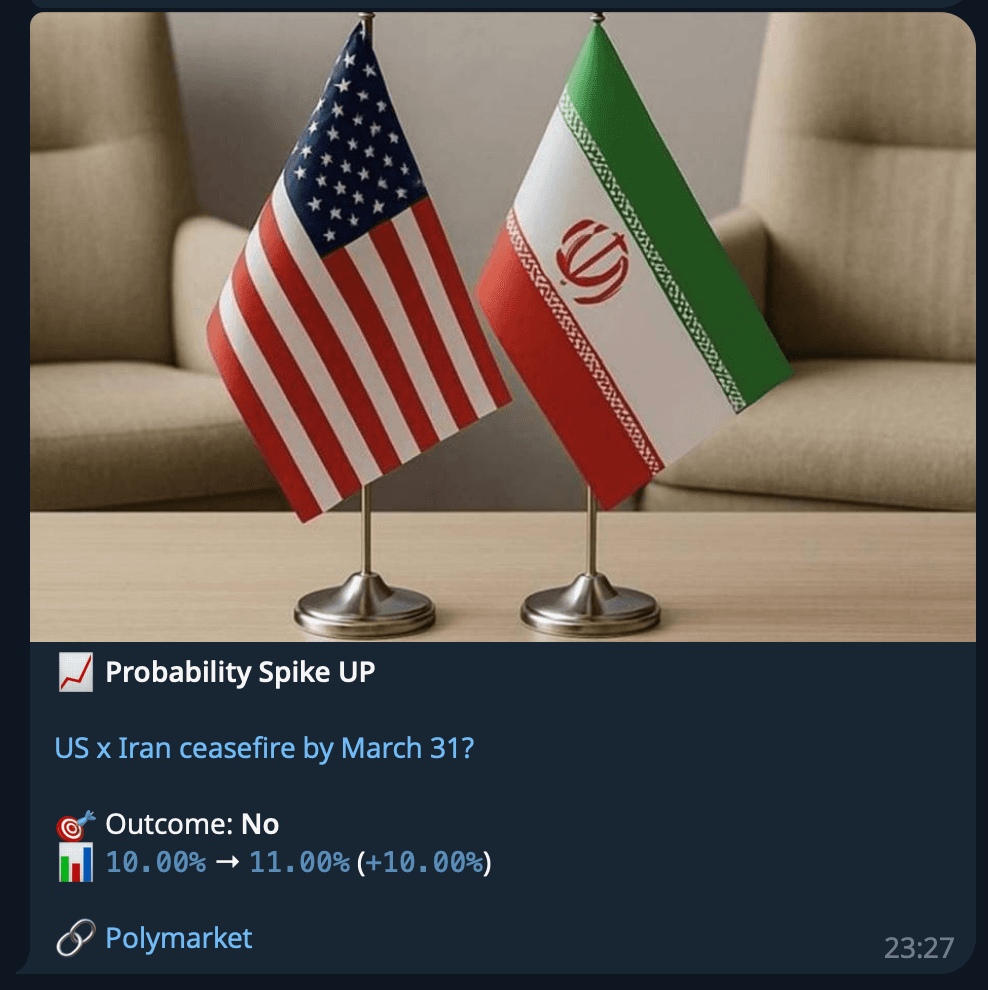
For trader events, we include the full wallet address (never truncated), the outcome, side, amount, price, and share count. Links go to Polymarket for the market and Polygonscan for the transaction and wallet.
When a market has an image, we send it as a Telegram photo with the alert text as the caption. If the image fetch fails (happens occasionally), we silently fall back to a plain text message.
Tech stack and dependencies
The entire project has three runtime dependencies:
{
	"dependencies": {
		"@grammyjs/menu": "^1.3.1",
		"@structbuild/sdk": "^0.2.4",
		"grammy": "^1.35.0"
	}
}- grammY — Telegram bot framework. Supports webhook mode out of the box, which is exactly what we need for Workers.
- @grammyjs/menu — Inline menu plugin for grammY. Handles the complexity of multi-page keyboard UIs.
- @structbuild/sdk — Struct's TypeScript SDK for creating webhooks and looking up markets.
Development dependencies are just wrangler, typescript, and @cloudflare/workers-types.
Deployment is wrangler deploy. Database migrations are wrangler d1 execute. Local development uses wrangler dev with a cloudflared tunnel so Struct and Telegram can reach the local worker.
Lessons learned
Webhook reuse matters more than you think. Our first version created one webhook per monitor. It worked fine with 10 users. It would not have worked at scale. The scoring-based reuse system was more complex to build but makes the difference between hitting API limits at 100 users versus 100,000.
Serverless changes your state management strategy. No in-memory state means every interaction round-trip goes through D1. The upside: the bot survives restarts, redeployments, and scaling events without losing user context. The downside: more database writes per user action.
ctx.waitUntil() is essential for webhook handlers. Return 200 immediately, process in the background. If your webhook handler takes too long, Struct will retry — and now you're sending duplicate notifications.
Promise.allSettled over Promise.all for fan-out. One blocked user shouldn't break notifications for everyone else.
Store the webhook ID in the URL path, not just the database. Parsing the webhook ID from the URL path (/struct/webhook/{id}) is faster and more reliable than looking it up from the payload. It also means your routing logic doesn't depend on payload format.
Build your own
The bot demonstrates a pattern that works for any real-time alerting system on Polymarket:
- Receive events — Struct webhooks deliver events the moment they happen
- Route efficiently — Unique webhook URLs + database indexes for fast subscriber lookup
- Filter precisely — Server-side filters on Struct + client-side filters for per-user customisation
- Deliver reliably — Background processing, parallel sends, graceful fallbacks
You could build a Discord bot with the same architecture. Or a Slack integration. Or pipe events into a data warehouse. The webhook consumption pattern is identical — the only thing that changes is the output destination.
The bot is open source: github.com/structbuild/polymarket-telegram-alerts-bot
Get a Struct API key. The free tier includes full webhook access, no credit card required.